Vite 搭建基础脚手架
vue3-elemnt-plus-ts 项目 GitHub 地址
环境准备
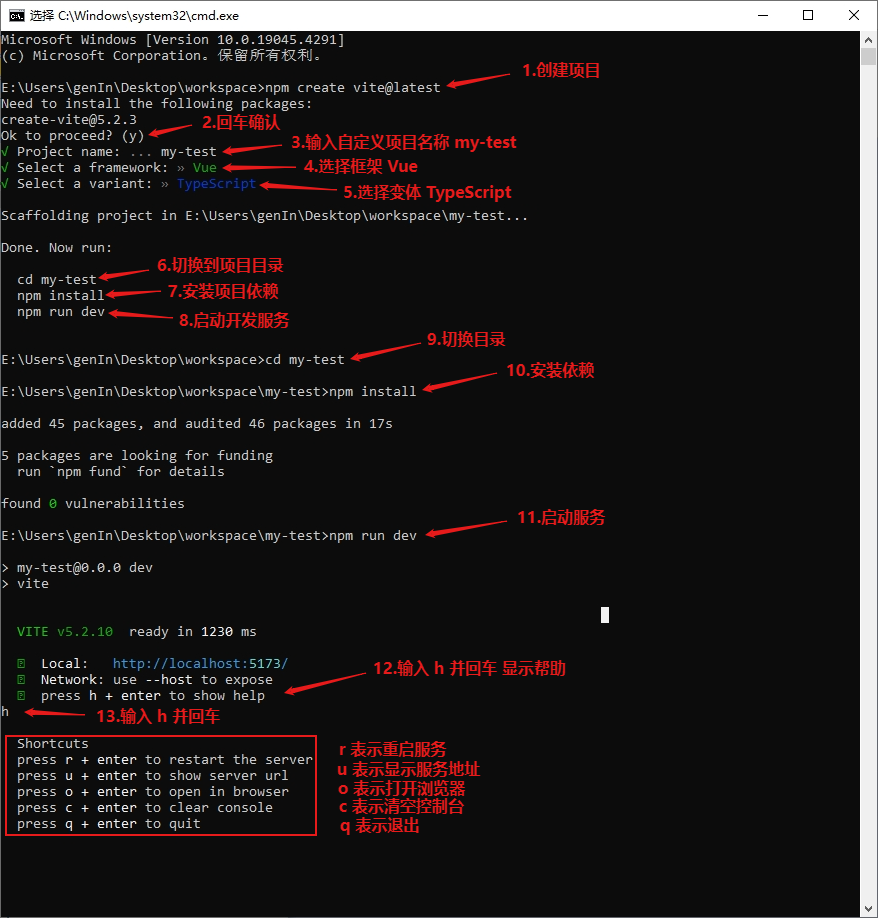
创建项目
图例
PowerShell 权限问题解决 PowerShell 权限问题执行
Set-ExecutionPolicy RemoteSigned
本地开发
# 安装项目依赖
$ npm install

# 启动开发服务器
$ npm run dev

# 构建生产
$ npm run build

# 预览构建
$ npm run preview
依赖包管理
# 列出已安装过时的依赖
$ npm ls

# 检查已过时的的依赖
$ npm outdated

# 升级项目依赖
$ npm update

# 升级指定包依赖
$ npm update <package-name>

# 升级指定包安装最新依赖
$ npm update <package-name> --latest
项目配置
删除 .gitignore 文件以下内容
.gitignore
.vscode/*
!.vscode/extensions.json
统一编辑器配置
- 安装插件 EditorConfig for VS Code
- 在项目根目录新建 .editorconfig 文件,填入以下内容
.editorconfig
# editorconfig.org
root = true

[*]
indent_style = space
indent_size = 2
end_of_line = lf
charset = utf-8
trim_trailing_whitespace = true
insert_final_newline = true

[*.md]
trim_trailing_whitespace = false
统一代码风格
- 安装插件 Prettier - Code formatter
- 安装依赖
$ npm install --save-dev prettier
- 在项目根目录新建 .prettierrc.json 文件,填入以下内容
.prettierrc.json
{
  "semi": false,
  "singleQuote": true,
  "bracketSpacing": false,
  "arrowParens": "avoid"
}
- 在项目根目录新建 .prettierignore 文件,填入以下内容
.prettierignore
# Ignore files:
/src/assets/fonts
/src/assets/iconfont
# Ignore all HTML files:
*.html
- 向 package.json scripts 属性中添加命令
package.json
"format": "prettier . --write --cache"
代码检查
- 安装插件 ESLint
- 安装依赖
$ npm install --save-dev eslint @eslint/js typescript-eslint
- 安装 prettier 相关依赖
$ npm install --save-dev eslint-plugin-prettier eslint-config-prettier
- 安装 vue 相关依赖
$ npm install --save-dev eslint-plugin-vue vue-eslint-parser
- 向 package.json scripts 属性中添加命令
package.json
"lint": "eslint .",
"lint:fix": "eslint . --fix"
- 在项目根目录新建 eslint.config.js 文件,填入以下内容
eslint.config.js
import eslint from '@eslint/js';
import tseslint from 'typescript-eslint';
import eslintPluginPrettierRecommended from 'eslint-plugin-prettier/recommended';
import eslintConfigPrettier from 'eslint-config-prettier';
import eslintPluginVue from 'eslint-plugin-vue';
import vueEslintParser from 'vue-eslint-parser';

export default tseslint.config(
  eslint.configs.recommended,
  ...eslintPluginVue.configs['flat/recommended'],
  eslintPluginPrettierRecommended,
  eslintConfigPrettier,
  { ignores: ['dist/'] },
  {
    languageOptions: {
      parser: vueEslintParser,
      parserOptions: {
        parser: tseslint.parser,
      },
    },
  }
);
Git 预提交钩子
- 安装依赖 husky lint-staged
$ npm install --save-dev husky lint-staged
- 向 package.json scripts 属性中添加命令
package.json
"prepare": "husky"
- 向 package.json 添加根属性
package.json
"lint-staged": {
  "*": [
    "npm run lint",
    "npm run format"
  ]
}
- 安装 Git,并设置换行符
$ git config --global core.autocrlf input
- 初始化 Git 仓库,首先需要进行第一次初始化提交
- 运行命令,生成 Git 钩子命令,使钩子生效
$ npm run prepare
- 向 .husky 目录下创建 pre-commit 文件,填入以下内容
.husky/pre-commit
$ npx lint-staged
视频版本步骤
Vite 构建脚手架(Vite 5 + Vue 3 + TypeScript 5 + Element-Plus 2)

准备环境
1.Node.js(https://nodejs.org/en/download)
2.VSCode(https://code.visualstudio.com/Download)
3.Git(https://git-scm.com/download/win)
4.Vite(https://cn.vitejs.dev/)

1.创建项目 npm create vite@latest
1.1 生成项目
1.1.1 回车继续,输入项目名称 vue3-elemnt-plus-ts
1.1.2 选择框架 Vue
1.1.3 选择变体 TypeScript
1.1.4 切换到项目 vue3-elemnt-plus-ts
1.1.5 安装项目依赖 npm install
1.1.6 启动项目 npm run dev

1.2 本地开发
1.2.1 安装项目依赖 npm install
1.2.2 项目启动开发服务 npm run dev
1.2.3 项目构建生产 npm run build
1.2.4 预览构建 npm run preview

1.3 依赖包管理
1.3.1 列出已安装的依赖包 npm ls
1.3.2 检查过时的依赖包 npm outdated
1.3.3 升级项目依赖包 npm update
1.3.4 升级指定依赖包 npm update <package-name>
1.3.5 安装最新依赖包 npm update <package-name> --latest

2.项目配置
2.1 .gitignore 文件删除以下内容
.vscode/*
!.vscode/extensions.json

2.2 统一编辑器配置
2.2.1 安装插件 EditorConfig for VS Code(https://editorconfig.org/)
2.2.2 在项目根目录新建 .editorconfig 文件,填入以下内容

# editorconfig.org
root = true

[*]
indent_style = space
indent_size = 2
end_of_line = lf
charset = utf-8
trim_trailing_whitespace = true
insert_final_newline = true

[*.md]
trim_trailing_whitespace = false

2.3 统一代码风格
2.3.1 安装插件 Prettier - Code formatter(https://prettier.io/)
2.3.2 安装依赖 npm install --save-dev prettier
2.3.3 在项目根目录新建 .prettierrc.json 文件,填入以下内容

{
  "semi": false,
  "singleQuote": true,
  "bracketSpacing": false,
  "arrowParens": "avoid"
}


2.3.4 在项目根目录新建 .prettierignore 文件,填写以下内容

# Ignore files:
/src/assets/fonts
/src/assets/iconfont
# Ignore all HTML files:
*.html

2.3.5 向 package.json scripts 属性中添加命令
"format": "prettier . --write --cache"

2.4 代码检查
2.4.1 安装插件 ESLint(https://eslint.org/)
2.4.2 安装依赖 npm install --save-dev eslint @eslint/js typescript-eslint
2.4.3 安装 prettier 相关依赖 npm install --save-dev eslint-plugin-prettier eslint-config-prettier
2.4.4 安装 vue 相关依赖 npm install --save-dev eslint-plugin-vue vue-eslint-parser
2.4.5 向 package.json scripts 中添加命令
"lint": "eslint .",
"lint:fix": "eslint . --fix"

2.4.6 在项目根目录新建 eslint.config.js 文件,填入以下内容

import eslint from '@eslint/js'
import tseslint from 'typescript-eslint'
import eslintPluginPrettierRecommended from 'eslint-plugin-prettier/recommended'
import eslintConfigPrettier from 'eslint-config-prettier'
import eslintPluginVue from 'eslint-plugin-vue'
import vueEslintParser from 'vue-eslint-parser'

export default tseslint.config(
  eslint.configs.recommended,
  ...eslintPluginVue.configs['flat/recommended'],
  eslintPluginPrettierRecommended,
  eslintConfigPrettier,
  {ignores: ['dist/']},
  {
    languageOptions: {
      parser: vueEslintParser,
      parserOptions: {
        parser: tseslint.parser,
      }
    }
  }
)


2.5  预提交钩子
2.5.1 安装依赖 npm install --save-dev husky lint-staged
2.5.2 向 package.json scripts 属性中添加命令
"prepare": "husky"

2.5.3 向 package.json 添加根属性
"lint-staged": {
    "*": [
      "npm run lint",
      "npm run format"
    ]
  }
2.5.3  初始化 Git 仓库,首先需要进行第一次初始化提交
2.5.4 运行命令 npm run prepare 生成 Git 钩子命令,使钩子生效
2.5.5 向 .husky 目录下创建 pre-commit 文件,填入以下内容

npx lint-staged

2.5.6 现在进行提交代码会触发 Git 预提交钩子 进行 npm run lint、npm run format 脚本命令
2.5.7 执行 npm run lint:fix 修复代码,再次提交即可成功,这样就不会有脏代码被提交了

本节构建基础脚手架结束,更多内容可以查看 codecodego.com 在线文档

结束